Starbucks Android App, Easy Mobile Payment
Rabu, 15 Juni 2011
0
komentar
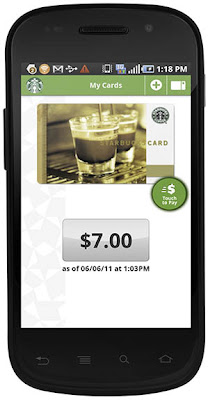
Are you coffee addict? Starbucks has launched android application for easy mobile payment. This application allows you to pay your coffee through android device.
Starbucks Android App Features
• Check your Starbucks Card balance
• Reload your Starbucks Card with a major credit card
• View your transaction history
• Pay with your Android™ phone at in any of the 6,800+ company-operated U.S. Starbucks stores, 1,000+ U.S. Starbucks Target locations, and Safeway stores
• Locate a mobile payment Starbucks near you
• Track your Stars in the My Starbucks Rewards program
Known Technical Limitations
• This application supports U.S. Starbucks Cards only, including Gold cards
• Starbucks Store Credit Cards or Duetto Cards are not supported
• This application is designed to support domestic phone numbers only; international phone numbers may not consistently be supported
• Starbucks supports your personal Starbucks Cards. Cards may only be loaded onto one device at a time. If you wish to reload a friend or family members’ Starbucks Card, please visit Starbucks.com/card
How to Download
1. Search Android Market
2. Open Android Market on Your phone
3. Go to "Setarbucks"
4. Type "Setarbucks" in the search field and hit "Search"
5. Once you find the "Setarbucks" app, choose "Install" and follow the instructions
It's a huge app size, about 11MB. After you download and install, you have to enter your Starbucks Card number and then scan it to pay for your coffee.
Starbucks Android App Features
• Check your Starbucks Card balance
• Reload your Starbucks Card with a major credit card
• View your transaction history
• Pay with your Android™ phone at in any of the 6,800+ company-operated U.S. Starbucks stores, 1,000+ U.S. Starbucks Target locations, and Safeway stores
• Locate a mobile payment Starbucks near you
• Track your Stars in the My Starbucks Rewards program
Known Technical Limitations
• This application supports U.S. Starbucks Cards only, including Gold cards
• Starbucks Store Credit Cards or Duetto Cards are not supported
• This application is designed to support domestic phone numbers only; international phone numbers may not consistently be supported
• Starbucks supports your personal Starbucks Cards. Cards may only be loaded onto one device at a time. If you wish to reload a friend or family members’ Starbucks Card, please visit Starbucks.com/card

How to Download
1. Search Android Market
2. Open Android Market on Your phone
3. Go to "Setarbucks"
4. Type "Setarbucks" in the search field and hit "Search"
5. Once you find the "Setarbucks" app, choose "Install" and follow the instructions
It's a huge app size, about 11MB. After you download and install, you have to enter your Starbucks Card number and then scan it to pay for your coffee.
Baca Selengkapnya ....


