After my old MP3 player broke, I've been searching around for a new one. While I originally had my eyes set on Apple's iPod Touch, I was a little intimidated by its price. Also the fact that the iPod requires use of iTunes in order to transfer songs turned me off, particularly because iTunes doesn't work on my computer. Every time I try to use iTunes, it either freezes my computer, forcing me to restart, or says that I have no local Internet connection when I try to download items. So, after that, I took a look around the web and I have to say that I found myself quite a nice collection of possible MP3 players to choose from. However, it is also because of this that I'm having trouble deciding which one I want. Each model has its own pros and cons and I could never find a MP3 player that contained all of the features I wanted. Let's take a look at the different models I found:
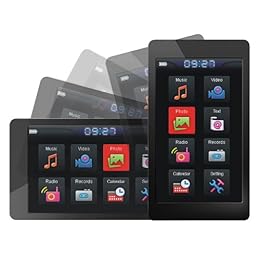
Latte Espresso 8GB: The Latte Espresso 8GB MP3 player comes from the Korean company known as Latte Communications. I have to admit that every time I hear this name I want to go buy myself a coffee from Starbucks LOL. The device comes in two different colors: Gun Metal and Black, though the Black version is much more difficult to find online. In every sense, the Latte Espresso can be considered a knock-off of the iPod Touch. It has a 3" touch-screen, but it is smaller than the iPod Touch's 3.5" touch-screen. Reviewers have noted the touch-screen's good sensitivity and easy user interface and navigation. There is also a haptic sensor which causes the screen to vibrate when you touch it to let you know that you actually did press a button. The G-Sensor allows the screen to turn from horizontal to vertical when you rotate the Espresso and is true for the completel 360 degrees. The Espresso has quite a nice screen resolution (420 x 240) for video and photo playback. The device also includes an internal clock, a calendar, and a voice recorder. The Espresso also comes with four free games for your entertainment. Also available is a FM transmitter, which I could not care less if the device came with this feature or not. Reviewers have also noted the excellent sound quality and easy transfer of songs onto the device (a simple drag and drop). The battery life can go up to14 hours for audio playback and 4 hours for video. Not too bad for a player with touch-screen, though I wish that it could be longer.
Some cons seem to be that the device tends to freeze if you work too quickly through the menus, that the device turns on every 2 to 3 minutes to remind you that it's locked (which wastes battery time), and also that the touch-screen is too small for accurate touch-screen use. Also noted is the lack of a built-in speaker, which is rather disappointing. While quite a few like the player's sleek gun-metal finish, I'm not quite a fan of its design. To me, I think it looks more like a cheap alarm clock or that someone just randomly stuck a screen onto a kitchen counter. Other than that, the Latte Espresso 8GB seems to be the way to go.
Latte Ice 8GB: The Latte Ice also comes from Latte Communications. However, instead of touch-screen, the player focuses on regular tactile button use, a thing that I'm trying to get away from. However, the good thing is that there is a separate button for each task, which can be quite handy as compared to other players that assign ten or more tasks to a single button and relies on the pressure you give to the button to determine which task you want (often times unreliable). The Latte Ice has a smaller screen compared to the Espresso, with a screen size of 2.8" instead of 3". Other than the touch-screen, it comes with all the features of the Espresso, including a FM transmitter, a voice-recorder system, and a high resolution screen for video playback. There is even a built-in speaker, which is certainly a plus. I believe the battery life lasts somewhat longer than the Espresso, but I'll have to check on that later. Another bonus is that the player comes with a wall charger so that I won't have to rely on my computer to charge the device (like the Espresso). Ice also comes with the game Tetris, though I have to admit that I'm not too much of a crazy fan about Tetris. I rather like Ice's sleek and expensive-looking design. It really reminds me of a camera that my sister bought in Nanjing this year. So far, the Latte Ice is also a strong contender for possible purchase.

: Departing from Latte Communications comes Sony's Walkman 545 model. Like the Latte Ice, the Sony Walkman requies the use of tactile buttons. I'm not quite sure but judging by the picture on Best Buy, the button usage seems to be modeled after the iPod Nano, with a scroll wheel and a separate button for going back to the Home menu. It also has a smaller screen (2.4"). The Sony Walkman comes with a built-in speaker and also has one of the longest potential battery lives I've ever seen with audio playback reaching up to 42 hours. The Sony Walkman also comes with a detachable stand for use while watching movies. I personally am not quite interested in the Sony Walkman, despite its nice features, as I am currently leaning more toward the Latte lines. Also the 545 model of the Walkman happens to be the most expensive out of all my choices. If I were to buy this device, I would be looking at the Black model. One thing I find funny is that the Red model seems to be $40 cheaper than the Black model on one particular website I forget its name.

: The Archos 3 Vision used to be at the top of my potential purchase list, that is before I found the Latte line. The Archos 3 Vision has a 3" touch-screen. It has most of the same features as any other MP3 player: FM transmitter, voice recorder, photo playback, etc. Unlike the Latte Espresso and Ice, it doesn't come with games but it is most certainly lighter than both of them. There is also no built-in speaker. However, it has the highest screen resolution out of the MP3 players I'm currently interrested in (420 x 320). That plus the fact that its sleek and minimalist design still remains to be my favorite. However, countless people have criticized the resistant touch-screen, which often requires two or more presses before a response is given, and the ineffective scroll wheel while navigating through songs, let alone the unfriendly user interface. The Archos 3 Vision comes in two different colors: Chocolate Brown and Red.
 Creative Zen X-Fi 8GB
: The Creative Zen X-Fi is the last MP3 player that I'm considering. When it comes to design, it certainly can't commpete with the other models I've found. The device has a hard plastic exterior and is also the thickest MP3 player I've come across so far. The screen size is also the same as the Sony Walkman (2.4") The X-Fi relies on the use of a 9-button grid, which many reviewers have complained that half the buttons are rarely used and cannot be set up as shortcuts. Other than that, most people seem to agree that the X-Fi comes with the best stock earphones. CNET has noted that the earphones have a retailer price of around $50 (Who knows?). The battery life lasts up to 30 hours for audio playback, which comes second with the Sony Walkman. The X-Fi also happens to be the cheapest out of all my choices. However, it's also at the bottom of Most-Likely-To-Be-Bought-list.

Pro-Ebiz 8GB: The Pro-Ebiz 8GB appears to be even more of a knock-off of the iPod Touch (It even looks like one!), and it is also the cheapest out of most of the players with touch-screen options. However, it is because of this that I'm afraid to purchase this item. Another reason is that it seems to come from a no-brand name company, so I dare not trust this device. Other than that, the Pro-Ebiz seems to come with most of the features of the iPod Touch other than the ability to go online or add more apps. It even has a built-in speaker which most players with touch-screens seem to not have. The battery life supposedly can last for 30 hours, which is certainly high among touch-screens. Some have also complained of its resistant touch-screen.

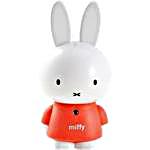
Latte Miffy 2GB: The Latte Miffy is a player that I won't be considering buying but I wanted to share this model with you. It's also comes from Latte Communications. The player is fashioned after the famous Miffy bunny character, and I have to say that this is the cutest MP3 player that I've ever come across. It's quite small so you can hang it around your neck. There are also different colored sleeves for purchase in order to change Miffy's shirt color. Also available for purchase is a docking station which shows Miffy next to a small house on a green plain. However, this MP3 player only comes with 2GB and you can only use it to listen to music. That means no video or photo playback, FM transmitter, or voice recorder. However, if you're someone like me who doesn't quite care for those things, then the Latte Miffy is a perfect gift for lovers of cute things. I believe the player works very much like the iPod Shuffle, where you aren't able to see which song you're choosing but can only recognize songs by ear.
Overall, like I said before, each MP3 player comes with its own pros and cons. While I want a player with sensitive touch-screen capabilities and a easy user interface and navigation, I lose the built-in speaker and long battery life features. The MP3 players that require the use of buttons have a built-ikn speaker and longer battery life but they also don't have the touch-screen. While I'm quite sure that more expensive MP3 players will have all of these capabilities, I can, unfortunately, only limit my budget to players below $100 as of current. After reading reviews of these products, I have grown quite paranoid and skeptical of buying them. While half the population seem to say that a certain device is the best, the other half argue that it's the worst player they have ever come across. The arguments of the haters seem to usually comprise of the device breaking within in the first month of usage, though I'm sure that this doesn't happen too often. In the end, I guess that I can only take a gamble and purchase the player I really want regardless of reviews. Then, whjen it arrives, I can only dearly hope that it will not break or not work and that I won't have to deeply regret my decision.